Another game already?!
Tear off a quest for the day in “A game in 14 sessions”. A one-pager (or two, if you count the multiplayer rules) for printing yourself.
https://ranarh.itch.io/14-sessions
 ALT
ALT
Tear off a quest for the day in “A game in 14 sessions”. A one-pager (or two, if you count the multiplayer rules) for printing yourself.
https://ranarh.itch.io/14-sessions
ALT
Some of the main feedback from our playtesting sessions was that “the game was too difficult at the start and too easy at the end.” Mainly due to the continuous slime attacks while the player is trying to build their stats. However, they found that once they had accrued power ups, the slime was an unworthy opponent.
Recommendation: Ease the early game difficulty curve by reducing enemy spawn rate and/or health in the first few waves and increase difficulty as waves progress. Implement a system where the enemies get more difficult based on the player’s upgrade status. This is still a work in progress.
2. spawn point
One of the play-testers found that when a new wave begins, the player is spawned in the same spot where the previous wave ended. This often results in being immediately surrounded by enemies, making it difficult to react or escape.
Recommendation: Respawn the player in an area with minimal enemies. This has since been implemented.
3. keyboard controls
The first play-tester did not test the game using a mouse, initially this was a mistake, however it highlighted a significant downfall to the game if you lack certain hardware. They struggled to shoot and navigate the character at the same time without a mouse.
Recommendation: Add keyboard centric controls. This has been implemented.
4. pause option
A play-tester discussed a want for a pause option, stating that they felt unable to take breaks or manage interruptions during gameplay.
Recommendation: Add a pause menu using the standard key input (esc). This pause menu should temporarily halt the in game activity and include options such as ‘Resume’ and ‘Quit To Menu’. This has not been implemented as of yet.

We have completed our first wave of play testing with interesting results and to varying degrees of professionalism.
Our first play-testers were confidants and tested a funky version of the game, meaning it was not the current version at the time.
This was due to our team experiencing difficulties using github as a source for the code, modifications were not syncing up correctly and were causing many issues. We have since sorted the issue by communicating when someone is planning to make a commit to the github.
The initial play-tester used only the trackpad and mouse keys, they gave feedback that using a mouse would make the game much more enjoyable, as they were struggling to pass the first wave. They suggested using the space bar to shoot and wanted more bones (even though bones are unlimited?). The first play-tester did not make it past the first wave due to trackpad difficulties. However they thoroughly enjoyed the art style and said it felt very nostalgic. Their final comment was “I think this would be a really good game if you had a mouse, not a trackpad, but I still think its fun and its simple enough that its easy to control.”
The second play-tester used a mouse and had more success than the first tester. They got past the first wave with limited health points and did not understand the point of buffer page, so exited without any powerups and died immediately after. Despite this they still enjoyed the game. Their overall thoughts were “the game was so exhilarating. I thought the game was pretty good, I liked with the mouse it was better to operate, I like the villains, I like the aesthetic, I like the choice of the skull, it’s cool.”
The first play-tester took another turn with the mouse this time and made it past wave 10 (once informed about the buffer page’s functions). They were locked in during this second attempt and found the game to be “exhilarating” and left final thoughts of “ok I fuck with this. I like that instead of a zombie hoard they use little blobs, it has the same effect.”
Overall the feedback from both play-testers was overwhelmingly in favour of a more difficult enemy, they thought as you receive more rewards and power ups the enemy should also become harder to beat, potentially introducing a boss slime?
Though we didn’t get formal documentation from these play-testers due to the documents not being ready at the time. We felt we received valuable feedback and have since begin working on solutions for the issues identified. For example tester #2 not knowing what the buffer page was prompted our developer Luca to input an explanation page before the first buffer screen.
We are excited to implement the feedback collected and test our new iteration on the next batch of play-testers.

Desktop Cat Cafe is coming soon to Steam


The creators of Desktop Cat Café, Samyam and Lockyaw, have unveiled their next project—a desktop cat game set to launch on Steam upon its release.
You’ll be able to create your perfect cat café in this charming, bite-sized management sim that sits right at the bottom of your screen!

It’s not a very good quality video, but here’s a little look at the project so far!
After a VERY busy month, not much progress has been made, but it is starting to shape up I think. My goal design-wise is to create the “bones” of the level design, then fill the gamespace with detail.
I’ve leart that the two main ways to make an environment feel alive are sound design and movement, so I’ve worked to add these elements in three key ways:
-Water that moves/has sound effects
-A day/night cycle
-Movement sounds/animation
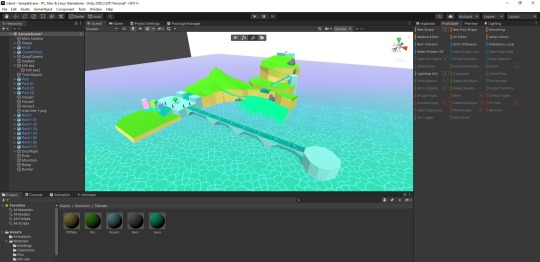
There are additinal steps I’m going to take to build further “living” elements into the game space, to really make it feel like a place worth exploring. I am DEFINITELY dodging the harder parts of development (i.e. actual coding), but I’m still happy with the progress so far.

Taking some time to enjoy my gift the wonders of tea too… a lovely and informative book #reading #personallibrary #teabook #gamesdev #pocgamedevs #gamedesigner #teabook #womenwhoread #dyslexicandproud
https://www.instagram.com/p/CX_R4SQIKvv/?utm_medium=tumblr

Got these beautiful book @mcmcomiccon and got them signed by the author so excited #reading #personallibrary #storybook #gamesdev #pocgamedevs #gamedesigner #book #womenwhoread #dyslexicandproud
https://www.instagram.com/p/CVVqv1BoZUt/?utm_medium=tumblr

A really interesting qnd thought provoking book which breaks the fourth wall with its inclusion of items from the storie in the book … I would never actually read somebody else’s notebook without permission but in play we do things differently and this book is definitely a a form of play dare I say a game #reading #personallibrary #storybook #gamesdev #pocgamedevs #gamedesigner #book #womenwhoread #dyslexicandproud #gamebook #playablebook
https://www.instagram.com/p/CRvzm3SLUZJ/?utm_medium=tumblr


Operator [Programming] - A symbol that tells the compiler to perform specific mathematical or logical manipulations
Compiler - Converts high-level programming languages [The last tab (4): ‘Assem/Interp/Compiler‘ has the most relevant information] (That use human words) to low-level programming languages/machine code [E.g.: C# down to Binary Code (Uses 0′s & 1′s)]
————————————————————–
Arithmetic Operators [Maths]:
Relational Operators [Comparisons]:
Logical Operators:
Assignment Operators:
————————————————————–
A programmer can access components within Unity using the ‘Dot Operator’ (’.’) and can control these components through scripts. Using the ‘Dot Operator’ is the equivalent of typing up an address (E.g.: ‘Country.State.Suburb’) - or opening up files to access files within.
For example, in the line of code below (Figure.1), the programmer asks Unity to find the renderer of the GameObject the script is attached to, access the ‘material’ of the GameObject within the renderer, then access the ‘color’ sub-category within the material. Once the color of the GameObject is found, the programmer can change the color of the material on the GameObject to red using the ‘Assignment Operator’: ’=‘.

Figure.1 (Change-Material-Color.jpg, 2020).
Extra Notes:
The below screenshot shows an example of the two different ways comments can be written within a script [Comments in the image = green text]:

Figure.2 (CommentsExample.jpg, 2021).
————————————————————–
References:
————————————————————–
‘Scripts’ - are considered to be ‘Behaviour Components’ within Unity. They are applied to GameObjects & can be seen within the ‘Inspector’ (Unity UI). Whatever ‘instructions’ are typed within a script attached to a particular GameObject, apply to that specific GameObject. The act of typing up a new script or editing an existing one is called scripting (A.K.A: Programming).
‘Statement’ - A single line of code (that ends in a semi-colon - in C#).
‘Variables’ - represent/hold information (like ‘digital boxes’). There are different types of variables that hold different types of information:
Variable Types:
Just below (Figure.1) is an example of how a variable is typed up in C#. One starts by specifying the variable type, then gives the specific variable a name, then assigns information (data) for it to hold using the ‘Assignment Operator’ (’=‘). Variable names should be written in ‘camelCase’.

Figure.1 (VariableStructure.jpg, 2020).
Establishing the variable type and the name of the variable is the ‘Declaration’ of the variable. The ‘Initialization’ of the variable is once the variable is has been assigned specific information to be used within the script (Figure.2).

Figure.2 (Declaration&Initalization.jpg, 2020).
————————————————————–
‘Functions’ - (also known as ‘Methods’) - are blocks of code dedicated to a particular purpose which can be called from other parts of your code. They take in variables to use and ‘return’ variables (as results) after Unity is finished performing the tasks that make up the function. [‘Void’ type functions are the only functions that don’t return anything (The word ‘Void’ itself means ‘nothing’)].
As functions can be ‘called’ more than once, they are a great way to optimise code. If a programmer reuses code that has already been typed up as much as possible, then that saves them time and effort typing up new code.
The Basic Structure of All Functions (Figure.3):
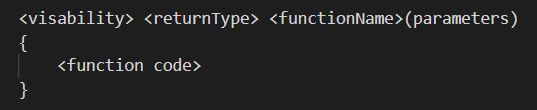
Figure.3 (FunctionStructure.jpg, 2020).
One can call a function simply by typing the name of the function and adding curly braces for the parameters that are needed. If there aren’t any, then they’re left bare (E.g.: FunctionName();) (Figure.4).

Figure.4 (CallingFunction.jpg, 2020).
A function that has a result requires a declared variable to hold this end result within, before this information can be sent out to other parts of a script using a ‘return statement’ at the end of the function. (One can call a function within another function).
Here are some examples of specific functions that already exist with Unity from the beginning and their purposes: (Figure.5).
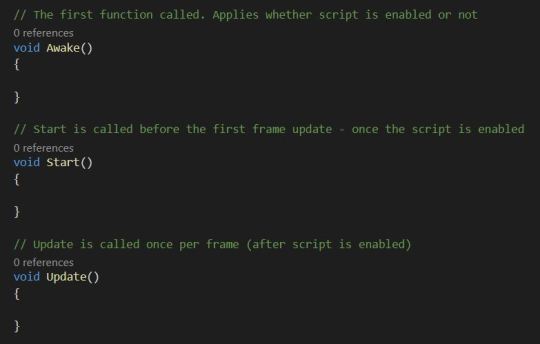
Figure.5 (ExampleFunctions.jpg, 2020).
————————————————————–
References:
————————————————————–
Back in university, there wasn’t really enough time for me to go over everything within the beginner/intermediate level of games programming properly. The nature of university life meant that I had to focus on fulfilling the specific requirements of my assessments and getting them done quickly.
In my opinion there is no such thing as understanding your fundamentals too well, so I plan on writing up blogs to thoroughly go over the basics of C# programming for Unity and make my way up. That way, although I’ll be going over things I already know, if I have missed anything I’m bound to come across it along the way (and extend past where I got up to with time).
My ‘C# Unity Revision’ Blogs:
+ C# Unity Revision Notes - Part 1: Variables & Functions
+ C# Unity Revision Notes - Part 2: Different Types of Operators
————————————————————–

#Target #ShootingGame #Download here https://play.google.com/store/apps/details?id=com.intagames.gun.shooting.target.range


The final product was something the entire team was happy with, more than happy with! The arrow, enemies and arena felt great while in the VR and having over 15 different people playtest it, all 15 said they really enjoyed the experience and would play again especially if it had more levels or items to use!
You can see the final product here, a short trailer we made for the game!
Landing on the idea of Magma Defence we had to jump straight into it.
I was project lead for this assignment and wanted to keep the art style fun and accessible, so some environments were designed off Spyro, Runescape and World of Warcraft.
I also had to develop the Blueprints for this game which was my first real wall I ran into with the software, I designed a wave system, triple shot arrows and lots more blueprints from timers, health system, game modes, tutorial levels, difficulty and more.
We got a good start with the low poly style and it ended up being an amazing project to work on for 3 weeks.

My next upcoming brief is “The Lighting brief”.
The idea is the base a level design around the idea of light funnily enough, and here are a few of the ideas I came up with.
1. “The Projector”
The idea is that you explore a mansion and its many dark rooms eventually finding a room which in its centre holds a projector facing a blank wall and around the room 3 portals.
Each portal takes you to a different room of the mansion holding different puzzles and traps rewarding you with a different coloured light for each room.
After you retrieve all the lights you find your way back to the project room and place them inside the projector.
After this the projector projects the lights on the wall blending them all into a white light and creating a transparent material you can walk through.
This leads into a long dark corridor with a very well lit room at the end.
This end room holds another final puzzle which is lots of mirrors you must rotate to beam the light back at the projector down the hallway.
When both lights finally meet you create a final portal taking you to the end of the game.
This is only one of my ideas and is currently in the making, stay tuned throughout the next few weeks to see more development and progress eventually ending with a final finished level!

My obsession with organization STILL LIIIIVESSSS 😳😳😳😳😳 the first steps to this blankity blank project is feeling pretty awesome 😎😎😎so excited 🤗🤗#programming #csharp #coding #gamesdev #photography #interfacedesign #abstract #policenauts #silvercase #visualnovel #characterdevelopment #textadventure #gaming #lovecraft #horror #simulation #mystery #project
https://www.instagram.com/p/BusGTSDlGz7/?utm_source=ig_tumblr_share&igshid=1k68lyzrkfkba


The Southern Swedish game weeks in Skåne and Blekinge will begin on Friday May 18th with Creative Coast Festival in Karlshamn followed by Nordic Game in Malmö.
Creative Coast Festival is an eclectic mix of digital creativity, moving fluidly from games, art and visual design through sound and biohacking. This is the 4th year we’re running it, and this year we’re happy to have speakers and exhibitors joining us from Canada to Kuala Lumpur.
You’ll move from a talk on animation with Blizzard to a discussion on how memes shape the cultural and political discourse, breaking to check out the expo where a mix of students and industry professionals showcase everything from tea rituals to VR experiences and bio implants.
[[MORE]]Creative Coast is a smaller festival but not less and it’s strategically important for Southern Sweden Creatives. The festival represents the gaming industry in Blekinge and is partly organized by Southern Sweden Creative’s partner organization, Netport Sience Park and GamePort.
For more information go to the Facebook event here or visit their website.


