
Starting to become a pretty big fan of regex. Want to validate a string and not use an absurd amount of code?
Text

NGINX map Directive: Guide to Conditional Variables
The NGINX map directive is one of the most powerful yet underutilized features in NGINX configuration. It allows you to create variables whose values depend on the values of other variables, enabling complex conditional logic without the performance penalty of multiple if statements. This guide covers everything you need to know about the NGINX map directive, from basic syntax to advanced…
Text
NGINX Rewrite Rules: The Complete Guide to URL Rewriting
URL rewriting is one of the most powerful features of NGINX, yet it remains one of the most misunderstood. If you have ever struggled with NGINX rewrite rules, copied configurations from Stack Overflow without understanding them, or wondered why your URL redirects are not working as expected, this guide is for you.
In this comprehensive guide, you will learn everything about NGINX URL rewriting:…
Text
NGINX Location Priority: Complete Regex Matching Guide
Understanding how NGINX routes requests to different location blocks is essential for anyone configuring web servers. The location directive is one of the most powerful yet frequently misunderstood features in NGINX configuration. Getting NGINX location priority wrong can break your application, create security vulnerabilities, or cause subtle bugs that are difficult to diagnose.
This…


Answer

Thank you! :D I love RegEx as well, write it for fun actually xD
If anyone needs a RegEx written, send me the requested specifications and I’ll write it for you :3
Text

used a complex regex for io/string manipulation. you wish you were as powerful as i
Text

when you write a really long spreadsheet formula and/or regular expression that solves all your problems 🥴🥴🥴
Text

JavaScript Regex Made Easy: Tips, Tricks, and Examples
Regular Expressions, commonly known as Regex, are a powerful feature in JavaScript that allow developers to search, match, and manipulate strings efficiently. Whether you’re validating email addresses, phone numbers, or cleaning up user input, understanding Regex can save a lot of time and make your code more robust.
In this blog post, we’ll break down Regex in JavaScript, explain key concepts, share useful tips, and provide practical examples for beginners and intermediate developers.
What is Regular Expression (Regex)?
A regular expression is a sequence of characters that defines a search pattern. Think of it as a way for JavaScript to identify specific text patterns in strings. Regex is widely used for validation, search, replace operations, and string manipulation.
In JavaScript, Regex can be used in two ways:
- Using regex literals
let pattern = /hello/;
- Using the RegExp constructor
let pattern = new RegExp(“hello”);
Both methods create a Regex object that can be used with JavaScript string methods like .test(), .match(), .replace(), and .search().
Common Regex Methods in JavaScript
1. .test()
Checks if a pattern exists in a string and returns true or false.let pattern = /world/; console.log(pattern.test(“Hello world”)); // true
2. .match()
Returns an array of matches found in the string.let text = “I love JavaScript”; let matches = text.match(/JavaScript/); console.log(matches[0]); // “JavaScript”
3. .replace()
Replaces matched patterns in a string with a new value.let text = “I love cats”; let newText = text.replace(/cats/, “dogs”); console.log(newText); // “I love dogs”
4. .search()
Returns the index of the first match or -1 if not found.let text = “Learn JavaScript”; console.log(text.search(/JavaScript/)); // 6
Basic Regex Patterns
Here are some common patterns used in JavaScript Regex: Pattern Description Example . Matches any single character /a.b/ matches “acb” ^ Start of string /^Hello/ matches “Hello World” $ End of string /World$/ matches “Hello World” \d Matches any digit [0-9]/\d/ matches “7” \D Non-digit /\D/ matches “a” \w Word character [a-zA-Z0-9_]/\w/ matches “A” \W Non-word character /\W/ matches “!” \s Whitespace /\s/ matches “ ” \S Non-whitespace /\S/ matches “a” + One or more occurrences /a+/ matches “aa” * Zero or more occurrences /a*/ matches “aaa” ? Zero or one occurrence /a?/ matches “a” or “” [abc] Matches any character a, b, or c /[abc]/ matches “a” [^abc] Matches anything except a, b, c /[^abc]/ matches “d”
Practical Examples
1. Email Validation
let emailPattern = /^[a-zA-Z0-9._%+-]+@[a-zA-Z0-9.-]+.[a-z]{2,}$/; console.log(emailPattern.test(“example@gmail.com”)); // true
2. Phone Number Validation
let phonePattern = /^\d{10}$/; console.log(phonePattern.test(“9876543210”)); // true
3. Replacing Multiple Spaces
let text = “JavaScript is awesome”; let cleanedText = text.replace(/\s+/g, “ ”); console.log(cleanedText); // “JavaScript is awesome”
4. Extracting Numbers from a String
let str = “There are 15 apples and 20 oranges”; let numbers = str.match(/\d+/g); console.log(numbers); // [“15”, “20”]
5. Case-Insensitive Matching
let pattern = /javascript/i; console.log(pattern.test(“I love JavaScript”)); // true
Tips & Tricks for JavaScript Regex
- Use the g flag for global search – finds all matches, not just the first.
let text = “apple banana apple”; let matches = text.match(/apple/g); console.log(matches); // [“apple”, “apple”]
- Use the i flag for case-insensitive matching – ignores uppercase/lowercase differences.
- Escape special characters using \ if you want to match characters like . or ?.
let pattern = /./; // matches a dot
- Test regex with online tools – Tools like regex101.com help visualize matches and understand patterns.
- Keep patterns readable – Avoid overly complex regex; break down tasks into smaller regex patterns if needed.
When to Use Regex
Regex is extremely useful when you want to:
- Validate user input (emails, passwords, phone numbers)
- Search and extract patterns from text
- Replace or clean strings efficiently
- Analyze logs or text data
However, avoid overusing Regex for very complex operations as it can become hard to read and maintain.
Conclusion
JavaScript Regular Expressions are a powerful tool that every developer should learn. From validating forms to extracting data from strings, Regex makes string manipulation efficient and flexible.
By understanding basic patterns, flags, and methods like .test(), .match(), and .replace(), beginners can handle most real-world scenarios. Remember to practice with examples, use online regex testers, and gradually explore advanced patterns.

Text

Ah yes. The circle of hell nobody ever talks about.
Regular Expressions
Text

Searches for use with MagicCon Atlanta Unknown Event Playtest Cards
A few Unknown Event Playtest Cards can be see here.
The Snapstone Wielder: -t:land
The Traveling Postman: o:/create/ -o:/that’s a copy/
Text

High-Performance JavaScript RegExp Escaping with Fast-Escape-Regexp
fast-escape-regexp is a high-performance JavaScript utility that escapes special characters in a string for safe use in regular expressions.
This TypeScript-written library delivers 2-3x faster performance compared to existing solutions while maintaining compatibility across all JavaScript runtimes, including browsers and Node.js.
Key Features:
Performance optimization: Delivers 2-3x faster…
High-Performance JavaScript RegExp Escaping with Fast-Escape-Regexp
Text

Regex Is An Esoteric Language
Hot take: Regex is an esoteric language.
es·o·ter·ic
/ˌesəˈterik/
Intended for or likely to be understood by only a small number of people with a specialized knowledge or interest.
And yes, regular expressions are programs! (literally)

Answer

Mine, but of course!
When I joined Tumblr, I was only expecting to save the pr0n and cat pics that I liked. I didn’t want others to link it with my normal online personality.
Then I found @dailyrothko , whose posts make me ecstatic each time. I wound up going to the Rothko compendium in Paris last year because I wanted to compare colors.
Recently I have subscribed to a lot of trans blogs that pretend to be Linux distros. These have been very eye-opening but also comforting. I’m too old and too comfy with my Johnson bar to come out of an egg. Nevertheless, I am glad to hear the minds of people that could have helped me three decades ago.
Oh, and I am not the hidden account of someone famous.
Thank you very much for your question!
Link

This is a good overview of how regex works

“Regex is a pattern-matching language; it’s a way to expressively describe patterns that match strings (e.g., words or sentences). For example, say you’re searching your hard drive for an image called foo, but you cannot remember if it’s a JPEG or a PNG. Many utilities make use of regex for searching, transforming, and interacting with text.”
You won’t be able to just effortlessly compose your own regex after just reading the linked article, but a quick read through will at least help put it in context. It also gives a feel of what regex can be used for. The reason regex persists after many years, despite looking very confusing, is that it is very powerful. With many GUI applications, you could well find regex running in the background to perform the more complex tasks.
See https://www.howtogeek.com/get-started-with-regex-in-linux-terminal

Video

Mastering the grep Command in Linux
Unlock the full power of grep in Linux with this comprehensive tutorial! Whether you’re a beginner or an advanced user, learn how to effectively search, filter, and manipulate text files and logs using the powerful grep command. Mastering this tool will save you time and boost your productivity.
In this video, we cover everything from basic usage to advanced techniques including regular expressions, recursive search, and context filtering. By the end of this video, you’ll be using grep like a pro, making it an essential tool in your Linux toolkit.
Setting up the environment for grep – Learn how to set up directories and files for testing common use cases like log analysis.
Basic grep usage – Search for exact string matches with options like -i (case-insensitive) and -n (line numbers).
Recursive search – Use grep to search through all files and subdirectories with the -r flag.
Regular Expressions – Discover how to search for complex patterns using grep’s extended regex capabilities.
Showing context – Learn how to display lines before (-B), after (-A), and around matches (-C) to give more context to your searches.
Advanced grep options – Count matches (-c), invert matches (-v), match whole words (-w), and more.
Color-coded output – Enable colored output for better visibility of matches.
Using grep with pipes and output redirection – Combine grep with other commands and redirect output to files.
grep "pattern" filename
grep -r "pattern" .
grep -E "Error|Warning"
grep -B 1 "Warning"
grep -C 1 "Error"
grep --color=always "pattern"
grep "pattern" file > output.txt
Text
2025-05-22: Commanders with 3 or more triggered abilities
Text

Arduino - reguläre Ausdrücke verwenden

In diesem Beitrag möchte ich dir zeigen, wie du mit regulären Ausdrücken Text auf dem Arduino prüfen kannst.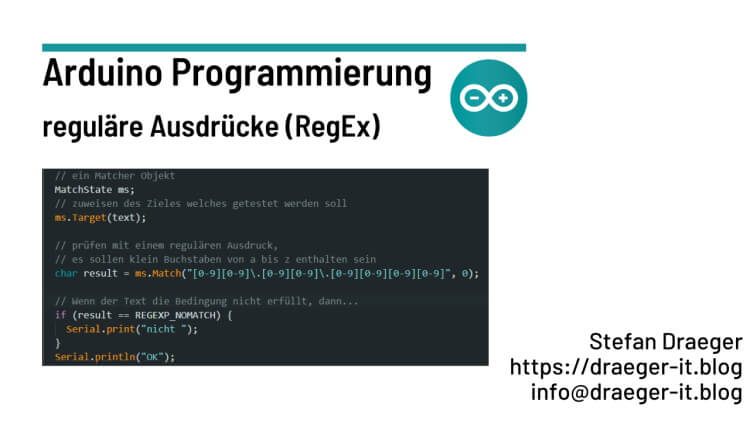
Mit regulären Ausdrücken kannst du Text auf eine bestimmte Syntax oder das Vorhandensein von Daten prüfen. Hierzu zählt zbsp. das Prüfen auf den korrekten Aufbau einer E-Mail, Telefonnummer etc. Man kann aber auch prüfen oder zählen, wie oft eine Zeichenkette in einem Text vorkommt.
Die regulären Ausdrücke sind manchmal sehr kompliziert und lassen sich auch ebenso gerade für Anfänger schwer lesen, hier hilft ein online-Tool wie https://regex101.com/ weiter, welcher dir beim Aufbau und Texten hilft.
Die Arduino IDE liefert per Default keine Funktionalität zum Ausführen von regulären Ausdrücken, hier müssen wir uns einer externen Bibliothek behelfen, welche wir über den Bibliotheksmanager installieren.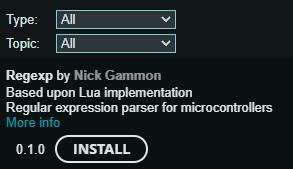
Der Entwickler hat im einen extra Forumeintrag unter https://forum.arduino.cc/t/new-regular-expression-library-released/59770 verfasst und dort die Funktionalität dieser Bibliothek beschrieben.
Achtung: Dieser Beitrag kann nicht alle RegEx behandeln, dafür gibt es einfach zu viele. Ich möchte mich hier auf einige wenige beschränken.
Aufbau eines regulären Ausdrucks
Ein regulärer Ausdruck muss einem bestimmten Format entsprechen. Wollen wir prüfen, ob ein Text mit einem bestimmten Buchstaben beginnt, so müssen wir das Zeichen ^ voranstellen.
Mit dem $ Zeichen am Ende stellen wir sicher, dass keine weiteren Zeichen mehr folgen sollen.
Um Buchstaben von einer bestimmten Range zu behandeln, schreibt man diese in eckigen Klammern. Somit ergibt sich zbsp. ein regulärer Ausdruck zum Prüfen auf den Namen Stefan.
^Stefan$
regulären Ausdruck (RegEx) am Arduino Nano
Wollen wir zunächst einen einfachen kleinen Text prüfen, ob in diesem Kleinbuchstaben von a bis z enthalten sind.
// Bibliothek für die funktionalität für reguläre Ausdrücke
#include
void setup() {
// beginn der seriellen Kommunikation mit 9600 baud
Serial.begin(9600);
// der Text welcher geprüft werden soll
char* text = “Test”;
// ein Matcher Objekt
MatchState ms;
// zuweisen des Zieles welches getestet werden soll
ms.Target(text);
// prüfen mit einem regulären Ausdruck,
// es sollen klein Buchstaben von a bis z enthalten sein
char result = ms.Match(“”, 0);
// Wenn der Text die Bedingung nicht erfüllt, dann…
if (result == REGEXP_NOMATCH) {
Serial.print(“nicht ”);
}
Serial.println(“OK”);
}
void loop() {
// bleibt leer
}
Der Code bewirkt, dass auf dem seriellen Monitor der Arduino IDE “OK” ausgegeben wird.
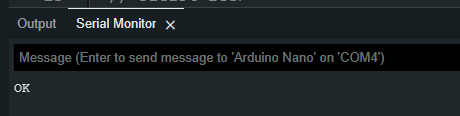
Wenn man jetzt prüfen möchten, ob der Text gleich “Test” ist, dann muss man den nachfolgenden regulären Ausdruck verwenden.
^Test$
prüfen eines Datums
Ein Datum gibt wiederum eine Besonderheit, denn dieses enthält einen Punkt, dieser Punkt steht im RegEx für ein beliebiges Zeichen, damit wir diesen Punkt jedoch als diesen behandeln können, muss dieser escaped werden. Den Punkt escaped man mit einem Backslash davor.
Nehmen wir das deutsche Datumsformat wie 01.12.2022, dann ergibt sich nachfolgender regulärer Ausdruck.
..
Eigentlich gibt es für die Prüfung auf exakte Anzahl von Buchstaben oder Zahlen die Möglichkeit, mit geschweiften Klammern zu arbeiten, jedoch unterstützt diese Bibliothek es leider nicht.
{2}.{2}.{4}
Read the full article
Text

heartbreaking: girl writes [a-z1-9] in her regex instead of [a-z0-9], spends half an hour debugging the program that mysteriously broke at the 10th element