Dribbble vs. Mobbin: How Top Designers Turn Ideas into Actionable Patterns
Scrolling through Dribbble can feel like a creative adventure. Stunning visuals, playful concepts, and endless “what if?” scenarios fuel your imagination. But as inspiring as this may be, it’s not always actionable. Likes, shares, and admiration don’t translate to user adoption or conversion.
That’s why designers turn to Mobbin. It’s a repository of real-world design patterns implemented in live products, showing “how it is” rather than “what could be.” Mobbin gives insight into what works, helping designers avoid guesswork and focus on functionality, accessibility, and measurable results.
For designers, product managers, and entrepreneurs, the key is knowing when to explore ideas and when to implement tested patterns. Use Dribbble to ignite your creativity and Mobbin to execute solutions that have been proven to succeed.
By combining the two, you can design smarter, not just prettier, during your sprints. It’s not about choosing inspiration over practicality—it’s about blending both for maximum impact.
How do you decide which creative ideas are worth implementing in your design projects?
Designers & Devs — ever felt your UI is one update away from chaos?
Here’s how to get it right ↓
It’s time to talk about your design system’s secret weapon: Design Tokens.
Many designers and developers struggle with maintaining consistency across their UIs, leading to chaotic updates and increased development time.
This guide will help you streamline your design process and ensure scalability.
Step 1: Understand Design Tokens (UI DNA) ↳ Design tokens are the fundamental values that define your UI, such as colors, typography, and spacing.
Step 2: Ditch Manual Styling ↳ Say goodbye to manual styling and embrace tokens for automated, consistent updates.
Step 3: Master Figma Management ↳ Learn how to efficiently manage design tokens in Figma to keep your design system organized.
Step 4: Naming Conventions ↳ Use clear and consistent naming conventions for your tokens to enhance collaboration and maintainability.
Step 5: Token-Driven Updates ↳ See how a single token change can update hundreds of UI elements, saving you time and reducing errors.
Want to go the extra mile? • Tip 1: Implement a token management plugin in Figma for easier handling. • Tip 2: Regularly audit your design system to ensure tokens are up-to-date and relevant.
By following these steps, you’ll be able to bring clarity, consistency, and collaboration to your UI.
Remember, a well-managed design system is the backbone of scalable UI.
I just dropped a new Figma carousel: “Design Tokens in Figma – The Secret to Scalable UI” 👉 Swipe through to learn how to future-proof your design system.
What’s your biggest challenge with design systems? Let’s discuss below.
RESEARCH : a tool that’s needed , yet seldom spoken .
( helpful to navigating path of artist )
goal : a command center / dashboard to see revenue and related numbers .
+ add’l uses : import into Square for business needs . + positives : brings subs ( & artists ) who desire the best streaming treatment for artists .
research tools : interviews
excerpts
“ advice : russ “
- “ [ don’t be ] givin’ away your masters & publishing … ” ( inspo : view-able from dash ) - “ … how much money you’re grossing a year off of streaming … grossing foreign ? netted ? “ ( inspo : update-able ) - “ … the amount of money being missed out on foreign streaming income … ”
……
“ advice : pharrell “ - “ … its [ the ] music , business . and both of them you should be well-versed in … ” - “ … creativity doesn’t come out of you …. its the universe … the universe is a library …. you just checkin out “ - “ … you should always ‘ own ’ your creations man … ”
As an artist , I would like to see the revenue grossed monthly from foreign and domestic streams so that I can be financially aware of progress .
As an artist , I would like to see who is in ownership of the masters and publishing of my work , so that I can bein full control and reward of my art .
IDEATE :
- “ revenue counter ” : be able to see revenue ( $ ) from streaming , along with goal revenue this month i.e. see streams and how they relate to masters ( owned - name ) , etc esp. foreign streams ( # ) , rev ( $$ ) gross ( total , per country ) esp. domestic streams ( total ) : ( # ) , rev ( $$ ) gross
- show the masters ( i.e. owned copyrights ) of tracks => relates to streams and future revenue .
PROTOTYPE :
TEST :
feedback
- the streaming revenue should be able to be sorted by quarter , as well as year and month to date .
- seeing the masters owned is enough !
PROTOTYPE , PT. II:
( prototype redesigned for simplicity )
added additional screens to represent different use cases ( masters not owned , etc . )
Generally weren’t sure what to do for this post so thought about the process I do when setting up files for handover to the development of a website. Generally towards the end of a finished and signed off website, I start ensuring all components are collated.
I generally try to categorise individual elements created on the site into their own UI sheets for easier understanding of the designs elements and components. It’s also useful for any future pages that may need creating.
I’ve been massively interested in design systems and something I’ve been pushing myself to learn more of in recent years.
Website components, instances, symbols whatever you want to call them are the absolute bomb when website designing, setting styles for your website makes the process so much easier in so many ways, you update one, you update them all.
Generally known as a design system - is a collection of reusable design elements, UI components and standards that guide their use. Greatly increasing speed of design.
Generally since starting to create reusable components in website design has made my workflow so much easier, it has become standard practice on every website I design. Does your website designer or you yourself use design systems?
.
.
.
#designsystem #designsystems #uicomponents #productdesigner #designer #digitaldesigner #design #digital #designinstances #componentdesign #designcomponents #ui #uidesign #websitedesign #websitemockup #webdesign #lovedesign #freelancelife #freelance #agencylife #designer #uiuxdesigner #systemdesign #programmer #xddesign #figma #freelancing #style #website #digital (at Sarah Bond Design) https://www.instagram.com/p/ClBH0jCLTDQ/?igshid=NGJjMDIxMWI=
Within graphic design, the concept of systems is profoundly rooted in form. Starting from a series of design research residencies in the context of the Porto Design Biennale, this volume proposes a variety of perspectives—social, cultural, political—to challenge this deeply ingrained tradition.
2 for 2 with important work meetings this week. Feeling more comfortable in my role & facilitating. Will Smith shared a post recently that went “If you cant beat the fear then do it scared”. Resonated! Imposter syndrome may never ease up but I still can be confident with moving forward.
On another note: one of my niece popped my chain while in the pool this week. I should be able to get it fixed tho. Tried to let them know the importance of it. Their Dad gave it to me in 2004, he got it made while stationed overseas during the Iraq War. Only gold chain Ive worn really. My HS g/f has been the only other person I let wear it but after that I said I would only allow my daughter to wear it. If I’m blessed with children oneday. Plan on making her my junior!
Introducing Alpine.js: A Tiny JavaScript Framework Like most developers, I have a bad tendency to over-complicate my workflow, especially if there’s some new hotness on the horizon. Why use CSS when you can use CSS-in-JS? Why use Grunt when you can use Gulp? Why use Gulp when you can use Webpack? Why use a traditional CMS when you can go headless? Every so often though, the new-hotness makes life simpler. Recently, the rise of utility based tools like Tailwind CSS have done this for CSS, and now Alpine.js promises something similar for JavaScript. In this article, we’re going to take a closer look at Alpine.js and how it can replace JQuery or larger JavaScript libraries to build interactive websites. If you regularly build sites that require a sprinkling on Javascript to alter the UI based on some user interaction, then this article is for you. Throughout the article, I refer to Vue.js, but don’t worry if you have no experience of Vue — that is not required. In fact, part of what makes Alpine.js great is that you barely need to know any JavaScript at all. Now, let’s get started. What Is Alpine.js? According to project author Caleb Porzio: “Alpine.js offers you the reactive and declarative nature of big frameworks like Vue or React at a much lower cost. You get to keep your DOM, and sprinkle in behavior as you see fit.” Let’s unpack that a bit. Let’s consider a basic UI pattern like Tabs. Our ultimate goal is that when a user clicks on a tab, the tab contents displays. If we come from a PHP background, we could easily achieve this server side. But the page refresh on every tab click isn’t very ‘reactive’. To create a better experience over the years, developers have reached for jQuery and/or Bootstrap. In that situation, we create an event listener on the tab, and when a user clicks, the event fires and we tell the browser what to do.
See the Pen Showing / hiding with jQuery by Phil on CodePen.
See the Pen Showing / hiding with jQuery by Phil on CodePen. That works. But this style of coding where we tell the browser exactly what to do (imperative coding) quickly gets us in a mess. Imagine if we wanted to disable the button after it has been clicked, or wanted to change the background color of the page. We’d quickly get into some serious spaghetti code. Developers have solved this issue by reaching for frameworks like Vue, Angular and React. These frameworks allow us to write cleaner code by utilizing the virtual DOM: a kind of mirror of the UI stored in the browser memory. The result is that when you ‘hide’ a DOM element (like a tab) in one of these frameworks; it doesn’t add a display:none; style attribute, but instead it literally disappears from the ‘real’ DOM. This allows us to write more declarative code that is cleaner and easier to read. But this is at a cost. Typically, the bundle size of these frameworks is large and for those coming from a jQuery background, the learning curve feels incredibly steep. Especially when all you want to do is toggle tabs! And that is where Alpine.js steps in.
WANT TO BUILD YOUR BUSINESS APP IN LARAVEL FRAMEWORK? ARKSSTECH,AGILE SOFTWARE DEVELOPMENT COMPANY OFFERS EXPERIENCED LARAVEL APP DEVELOPERS & TO HIRE LARAVEL DEVELOPERS FOR STARTUPS AND SMES. RENT A CODER TODAY!! Like Vue and React, Alpine.js allows us to write declarative code but it uses the “real” DOM; amending the contents and attributes of the same nodes that you and I might edit when we crack open a text editor or dev-tools. As a result, you can lose the filesize, wizardry and cognitive-load of larger framework but retain the declarative programming methodology. And you get this with no bundler, no build process and no script tag. Just load 6kb of Alpine.js and you’re away! Alpine.js JQuery Vue.js React + React DOM Coding style Declarative Imperative Declarative Declarative Requires bundler No No No Yes Filesize (GZipped, minified) 6.4kb 30kb 32kb 5kb + 36kb Dev-Tools No No Yes Yes WANT TO BUILD YOUR BUSINESS APP IN LARAVEL FRAMEWORK? ARKSSTECH,AGILE SOFTWARE DEVELOPMENT COMPANY OFFERS EXPERIENCED LARAVEL APP DEVELOPERS & TO HIRE LARAVEL DEVELOPERS FOR STARTUPS AND SMES. RENT A CODER TODAY!! When Should I Reach For Alpine? For me, Alpine’s strength is in the ease of DOM manipulation. Think of those things you used out of the box with Bootstrap, Alpine.js is great for them. Examples would be: Showing and hiding DOM nodes under certain conditions, Binding user input, Listening for events and altering the UI accordingly, Appending classes. You can also use Alpine.js for templating if your data is available in JSON, but let’s save that for another day. When Should I Look Elsewhere? If you’re fetching data, or need to carry out additional functions like validation or storing data, you should probably look elsewhere. Larger frameworks also come with dev-tools which can be invaluable when building larger UIs. From jQuery To Vue To Alpine Two years ago, Sarah Drasner posted an article on Smashing Magazine, “Replacing jQuery With Vue.js: No Build Step Necessary,” about how Vue could replace jQuery for many projects. That article started me on a journey which led me to use Vue almost every time I build a user interface. Today, we are going to recreate some of her examples with Alpine, which should illustrate its advantages over both jQuery and Vue in certain use cases. Alpine’s syntax is almost entirely lifted from Vue.js. In total, there are 13 directives. We’ll cover most of them in the following examples. Getting Started Like Vue and jQuery, no build process is required. Unlike Vue, Alpine it initializes itself, so there’s no need to create a new instance. Just load Alpine and you’re good to go. The scope of any given component is declared using the x-data directive. This kicks things off and sets some default values if required: … Capturing User Inputs x-model allow us to keep any input element in sync with the values set using x-data. In the following example, we set the name value to an empty string (within the form tag). Using x-model, we bind this value to the input field. By using x-text, we inject the value into the innerText of the paragraph element. This highlights the key differences with Alpine.js and both jQuery and Vue.js. Updating the paragraph tag in jQuery would require us to listen for specific events (keyup?), explicitly identify the node we wish to update and the changes we wish to make. Alpine’s syntax on the other hand, just specifies what should happen. This is what is meant by declarative programming. Updating the paragraph in Vue while simple, would require a new script tag: new Vue({ el: ’#app’, data: { name: “ } }); While this might not seem like the end of the world, it highlights the first major gain with Alpine. There is no context-switching. Everything is done right there in the HTML — no need for any additional JavaScript. Click Events, Boolean Attributes And Toggling Classes Like with Vue, : serves as a shorthand for x-bind (which binds attributes) and @ is shorthand for x-on (which indicates that Alpine should listen for events). In the following example, we instantiate a new component using x-data, and set the default value of show to be false. When the button is clicked, we toggle the value of show. When this value is true, we instruct Alpine to append the aria-expanded attribute. x-bind works differently for classes: we pass in object where the key is the class-name (active in our case) and the value is a boolean expression (show). WANT TO BUILD YOUR BUSINESS APP IN LARAVEL FRAMEWORK? ARKSSTECH,AGILE SOFTWARE DEVELOPMENT COMPANY OFFERS EXPERIENCED LARAVEL APP DEVELOPERS & TO HIRE LARAVEL DEVELOPERS FOR STARTUPS AND SMES. RENT A CODER TODAY!! Hiding And Showing The syntax showing and hiding is almost identical to Vue. This will set a given DOM node to display:none. If you need to remove a DOM element completely, x-if can be used. However, because Alpine.js doesn’t use the Virtual DOM, x-if can only be used on a (tag that wraps the element you wish to hide). Magic Properties In addition to the above directives, three Magic Properties provide some additional functionality. All of these will be familiar to anyone working in Vue.js. $el fetches the root component (the thing with the x-data attribute); $refs allows you to grab a DOM element; $nextTick ensures expressions are only executed once Alpine has done its thing; $event can be used to capture a nature browser event.
Let’s Build Something Useful
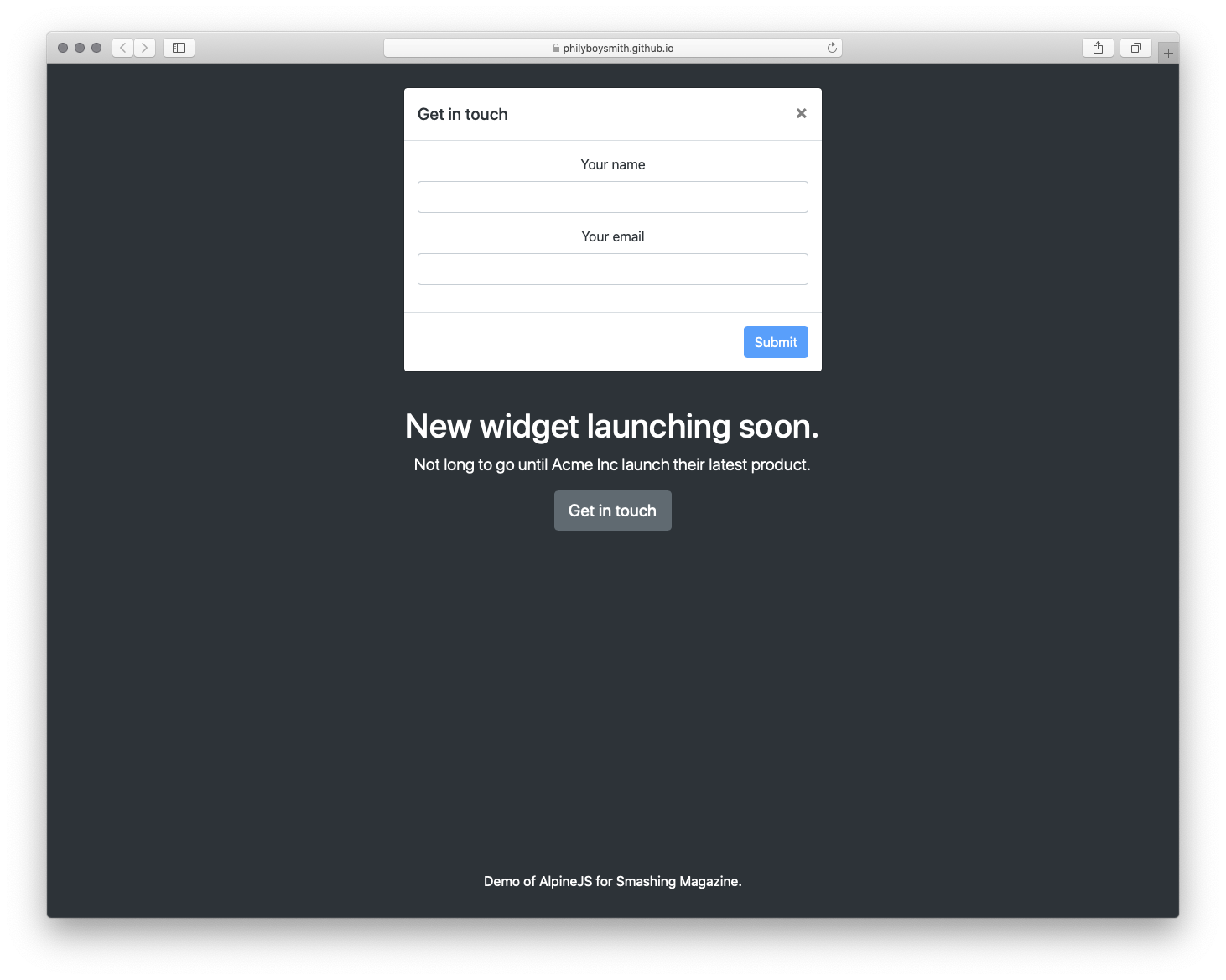
It’s time to build something for the real world. In the interests of brevity I’m going to use Bootstrap for styles, but use Alpine.js for all the JavaScript. The page we’re building is a simple landing page with a contact form displayed inside a modal that submits to some form handler and displays a nice success message. Just the sort of thing a client might ask for and expect pronto!
To make this work, we could add jQuery and Bootstrap.js, but that is quite a bit of overhead for not a lot of functionality. We could probably write it in Vanilla JS, but who wants to do that? Let’s make it work with Alpine.js instead. First, let’s set a scope and some initial values: Now, let’s make our button set the showModal value to true: Get in touch When showModal is true, we need to display the modal and add some classes: Let’s bind the input values to Alpine: And disable the ‘Submit’ button, until those values are set: Submit Finally, let’s send data to some kind of asynchronous function, and hide the modal when we’re done: Submit And that’s about it!
Just Enough JavaScript
When building websites, I’m increasingly trying to ask myself what would be “just enough JavaScript”? When building a sophisticated web application, that might well be React. But when building a marketing site, or something similar, Alpine.js feels like enough. (And even if it’s not, given the similar syntax, switching to Vue.js takes no time at all). It’s incredibly easy to use (especially if you’ve never used VueJS). It’s tiny ( There are more advanced features that aren’t included in this article and Caleb is constantly adding new features. If you want to find out more, take a look at the official docs on Github. WANT TO BUILD YOUR BUSINESS APP IN LARAVEL FRAMEWORK? ARKSSTECH,AGILE SOFTWARE DEVELOPMENT COMPANY OFFERS EXPERIENCED LARAVEL APP DEVELOPERS & TO HIRE LARAVEL DEVELOPERS FOR STARTUPS AND SMES. RENT A CODER TODAY!!
@adobe presents Real Conversations About #DesignSystems at @ga_phx with Jamie Nuzbach, Strategic Development Manager, Adobe XD; Aaron Forney, Product Designer, Emerge; Sean Rice, DesignOps Lead, @keap; Chad Bergman, Senior Designer, Design Systems, @godaddy; Marc Cattapan, Director of UX, @kitchensinkstudios; and John Huber, Senior UI/UX Designer, Banner Health. (at Scottsdale Waterfront) https://www.instagram.com/p/B6AAW25HHr5/?igshid=3ldemewz17cm
Design Systems - Neel Raj , Product Design @ Flipkart, India. Insights into what goes in building, maintaining, testing and scaling a design system as per local audiences and feedback received.
Some illustrations I made as part of a video intro to a talk @glenn.brownlee and I did at Javazone conference in Oslo yesterday about our design system at SpareBank 1. The illustrations were made in procreate and then spliced together with some sound design to make a video. You can check out the whole talk online on Vimeo now.
Link in bio.
#javazone #javazone2018 #sparebank1design #designsystem #designsystems #illustration #procreate #ipadpro #applepencil #thelastactionbutton #actionbutton #characterdesign #animation #cartoon @sparebank1design (at Oslo, Norway) https://www.instagram.com/p/Bnrc0_vhPzv/?utm_source=ig_tumblr_share&igshid=ugkgs0hboaxd